
Saturday, 11 June 2016


Tuesday, 25 June 2013
Send Email To Anyone With Any Email Id Without Making It Spam
Posted by M Qasim A Siddiqui
 Hello readers Most of you already know about some fake email sender website names which helps you to send fake mails, but all those fake mail sender websites are only capable to send email to other in a spam list but here in this tutorial I am going to show you a trick which can't be detected as a spam means receiver will receive your email as a genuine email. This trick will allows you to send emails to any friends with any other friend's name or you can directly called this method as a Email spoofing. E-mail Spoofing is a fake connection of mails that can be Spoofed to mail fake Mails for eg. An ATTACKER can send mails to any E-mail ID without Logging to victim's ID or the Spoofer ID, & an attacker can STEAL victim's Personal data or information.
Now Suppose if u wanna send mail to Kevin from Mac ID so you can use many types of FAKE MAIL SENDER OR ANONYMOUS E-MAIL SENDER, But all this services is spam, so by using this trick you send any mail to any E-mail ID without logging to any a/c.

Now Suppose if u wanna send mail to Kevin from Mac ID so you can use many types of FAKE MAIL SENDER OR ANONYMOUS E-MAIL SENDER, But all this services is spam, so by using this trick you send any mail to any E-mail ID without logging to any a/c.
NOTE : This service is not detected Spam yet.


Get serial key of all Softwares
Posted by M Qasim A Siddiqui
 Now you can get almost all serial keys from this websites :
Just Goto :
1) http://serials.ws/index.php
1) www.serialnumber.in
2) www.findserialnumber.com
3) www.keygenguru.com
4) www.keygens.nl
5) http://www.crackfound.com/
6) http://www.smartserials.com/
Enter the software name in search box ... And you are done !!
Entering software name in search box will make it available for you.

Just Goto :
1) http://serials.ws/index.php
1) www.serialnumber.in
2) www.findserialnumber.com
3) www.keygenguru.com
4) www.keygens.nl
5) http://www.crackfound.com/
6) http://www.smartserials.com/
Enter the software name in search box ... And you are done !!
Entering software name in search box will make it available for you.
Top 10 Free Mobile Recharge & Earning Sites ( 100% Genuine )

MOST POPULAR POST OF THIS SITE ↓↓
↓↓ Here Are The TOP 10 Genuine Sites For Free Mobile Recharge & Online Earnings ↓↓

Best site amongst all, that's why I keep this on first position. My favourite website for free mobile recharge. Joining Bonus Rs.10 and get Rs.3 for per referral, minimum recharge amount Rs.10. Click Here to Join.

NEW SITE : Join and Earn Rs.5 as a joining bonus. You can earn more by refeering others, per referrals you will get Rs.5. Click Here to Join.

NEW SITE : Join & earn 50 points. 10 points = Rs.1. You can earn points by adding friends and sending sms to others. Minimum recharge Rs.10. Click Here to Join.

Complete simple surverys and earn free mobile recharge. Earn Rs1 for per referrals and minimum recharge is Rs.10. Click Here to join.

Earn through referrals and complete quick surveys & offers for free mobile recharge earnings. Click Here To Join.

Another site which pays you for sending sms. Send Sms and Earn 2 paise / sms. Apart from sending sms, you can earn by playing quiz, refer others and get Rs.1 instantly, Joining bonus Rs.2, Minimum recharge Rs.10. Click Here to Join.

Joining bonus Rs.2, Earn 2 paise for per sms and Rs.1 for per referral, minimum recharge amount Rs.10. Click Here To Join.

Joining Bonus Rs.2 , enter guesses and get 30 paise for per guess, minimum recharge amount Rs.10. Click Here to Join.

Awesome site for free sms sending, invite friends and get Rs.1 for per referral. Click Here to Join.


Here U Will get money if u click on ads and refer other. Click Here to Join.

Complete simple surveys and refer friends for free recharge earning. Minimum recharge Rs.10. Click Here to Join.
Thursday, 20 June 2013
View Private Facebook Profile Picture in Full Size
Posted by M Qasim A Siddiqui
Facebook allows Us to Set Our Account or Profile Picture as Public or Private Mode.If We Use the Private Mode and Select the Privacy Settings as Visible to ‘Only Me’.Therefore We are not able to See their Images in Full Size Mode.See below for Detailed Instructions.

Facebook allows Us to Set Our Account or Profile Picture as Public or Private Mode.If We Use the Private Mode and Select the Privacy Settings as Visible to ‘Only Me’.Therefore We are not able to See their Images in Full Size Mode.See below for Detailed Instructions.
How to View Private Facebook Profile Picture in Full Size
- Go to The Timeline of the Person whose Profile Picture You want to View in Full Size.
- Right Click on the Profile Picture and Select the Option ‘Open Image in a new Tab’ as Shown below in the Image.
- Now Remove the s160X160 from the URL as Shown below in the Image.
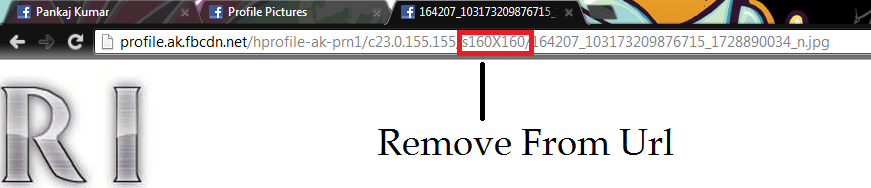
- After Removing Press Enter and You will be Able to View the Image in Full Size
Friday, 14 June 2013

How To Make Windows 8 Faster | Run Super Fast
Posted by M Qasim A Siddiqui


How To Make Windows 8 Faster | Run Super Fast – Follow The Below Guide
Disable Startup Programs
For Making Windows 8 Perform Faster you need to customize and Make certain Changes in the Configuration or Settings of Windows 8. There are few programs that can consume maximum resources and Make Your system to Perform at a Slow Rate.Therefore it is Necessary to Disable These Unwanted or Unnecessary Programs and to Do this First You Have to identify these Programs and After that You can disable or stop such programs in two Different ways:
Method – 1
At times, the start-up programs can slowdown Your Whole system. Windows 8 Task Manager provides you the option to Identify these programs and allows you to disable them. To do this first launch Task Manager, select Start-up and selectively disable the programs One by One.
Method – 2
Second option to make Windows 8 faster is to ‘Pin-point applications.’ To do this, right click on the Task bar and open Task Manager. You would find ‘More Details’ option and here you would see a list of certain programs highlighted. Make Free Voice Calls Anywhere Those are the programs that are consuming more resources and slowing down the system. This list would show which program is high on consumption of critical resources like CPU, Memory, Disk and Network. Simply disable such programs. This is called as ‘Pinpoint Application.’
Change Power Settings in Windows 8
By Changing the Power Settings in Windows 8 You can Make Your Windows 8 Run Faster.Lets Take a look at the power settings. To Open power settings Just press Windows button and Type ‘power plan’ and Press Enter. Now you would see Power Options window. Windows recommends “Balanced” power mode and ensure that this option is selected. Do not select “Power Saver” option under normal operations as it is intended to get more life out of battery only.
Screenshot Showing Power Configuration
Optimize Windows 8 Visual Appearance
An attractive feature of Windows 8 is its desktop animations. They are cool and attractive for sure but can also make Your Windows 8 OS to Perform at a Slower Rate. So, disable these animations to get an improved Overall System performance. How to Play Android Games on PC To do this, Just press the Windows key and type ‘System Performance Properties.’ Check the “Custom” radio button and now uncheck the button called “Animate Windows when minimizing and maximizing.” Also you can uncheck “Fade or slide menus into view”, “Fade or slide ToolTips into view”. The last two will add little speed of the OS.
Screenshot Showing Visual Optimization
Disable or Uninstall Third Party Antiviruses
Windows 8 Comes with Pre-installed Windows Defender so You don’t need third party anti-virus software which in turn can slowdown Your OS. Instead of Using these Antiviruses Just enable the ‘Included Security Applications’ which would run the Microsoft’s own anti-virus program called Windows Defender.
Use Sleep Mode Instead of Shutting Down
Instead of shutting down the system when you go away from the system temporarily, use Sleep mode of Windows 8. When you resume the system from sleep mode, it immediately gets back to the speedy mode. Also, during sleep mode your system does consume very low resources.
Optimize Your Hard Disk Performance
Hard drive optimization will add to the speed of Windows 8. To optimizing the hard drive use Windows Optimize Drive Tools (known as Disk Defragmenter in older versions).You can Easily Access the Optimize Drive Tools by typing the Keyword in Windows key and select ‘Settings.’ You would find “Analyze” and “Optimize” buttons. Select the drive and click Optimize. Prior to this you can carry out analysis of the drive.
Screenshot Showing Hard Disk Defragmentation
These above steps should make your Windows 8 to perform with optimized speed and Giving You a Faster Experience while Running Applications on Your Windows 8.
For knowing about latest updates, news, official announcements about upcoming versions of Windows 8, Visit Here – Click Here
Sunday, 9 June 2013
How To Increase Your Facebook Page Likes
Posted by M Qasim A Siddiqui

Every page owners wants to increase their
Likes of Facebook page. Most of you are started using autoliker sites for
quick likes, but let me remind you one thing, those likes are not real . All
autoliker sites provide you fake likes through fake accounts. So here I am back
with awesome site which gives you likes against likes. Yes, here you have to
follow some give and take policy like if you like others pages then your points
will be increased, so more you like then more you get. You can increase your
points by referring others too. So, start using this genuine site and forgot
about all autoliking fake sites.
1) Firstly, Click Here To Join Site.
2) Register your account and confirm your
Email Address.
3) After successful registration you will be
awarded as 50 Free points.
4) Now look for Add Site/Url and add your
facebook fan page link.
5) Add CPC for your page means how many point
you are going to award who like your page.
5) Now your setup task is complete. Just check
your facebook likes.
6) Now your main task
is to increase your points. So start liking other page and collect your
valuable points.
Note : You Can Increase Your Youtube Views,
Facebook Subscribers and Much More Through This Site.
Friday, 7 June 2013
Download Videos From Facebook
Posted by M Qasim A Siddiqui
You Can Easily Download any Videos From Facebook Using www.downvids.net
You Can Easily Download any Videos From Facebook Using www.downvids.net
Steps to Follow
- Go to Downfacebook.com – Click Here
- Here Paste the Facebook URL of the Video that you want to Download.
- Click Download and Your Video will be Downloaded Shortly
Download Facebook Photo Album with Single Click
Posted by M Qasim A Siddiqui


Here is a Simple Way to Download all the Photos From Your Friends Photo Album with Single Click without Downloading the Photos One by One.Follow the Below Steps to Download Facebook Photo Album with Single Click
.
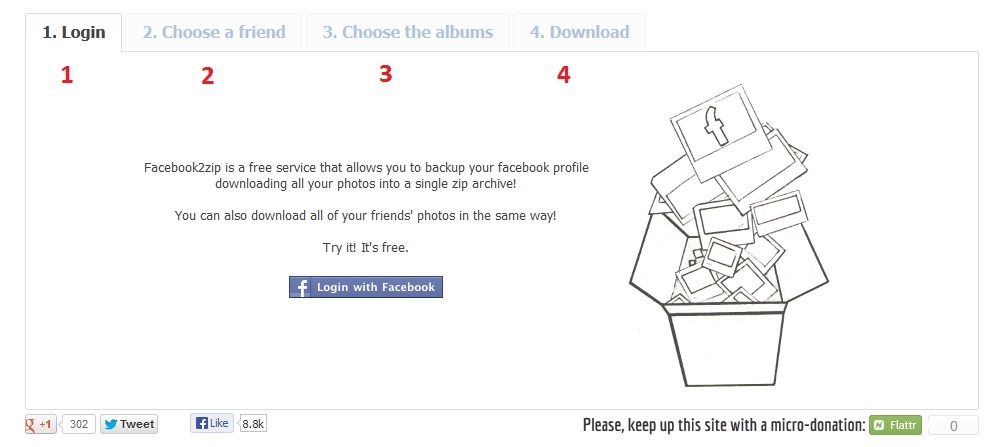
Steps to Follow
- Go to Facebook2.zip and Login to Your Facebook Account.
- Now Choose Friend from which you want to Download the Photo Album.
- Next Select the Album you want to Download.
- Click the Download Button and Select the Saving Location.
Live Cricket Streaming, Watch live cricket streaming on your PC free of cost. Most comprehensive live video coverage of cricket matches.
Posted by M Qasim A Siddiqui
Live Cricket Streaming, Watch live cricket streaming on your PC free of cost. Most comprehensive live video coverage of cricket matches.
Live Cricket Streaming, Watch live cricket streaming on your PC free of cost. Most comprehensive live video coverage of cricket matches.
Thursday, 6 June 2013
How to Take Screenshot Of Active Window Only.
Posted by M Qasim A Siddiqui
Take screenshot of Active Window Only
- First of all Switch to the Application or Windows of Which you want to Take Screenshot
- Now Press PRINT-SCREEN Button to Capture the Screenshot
e.g

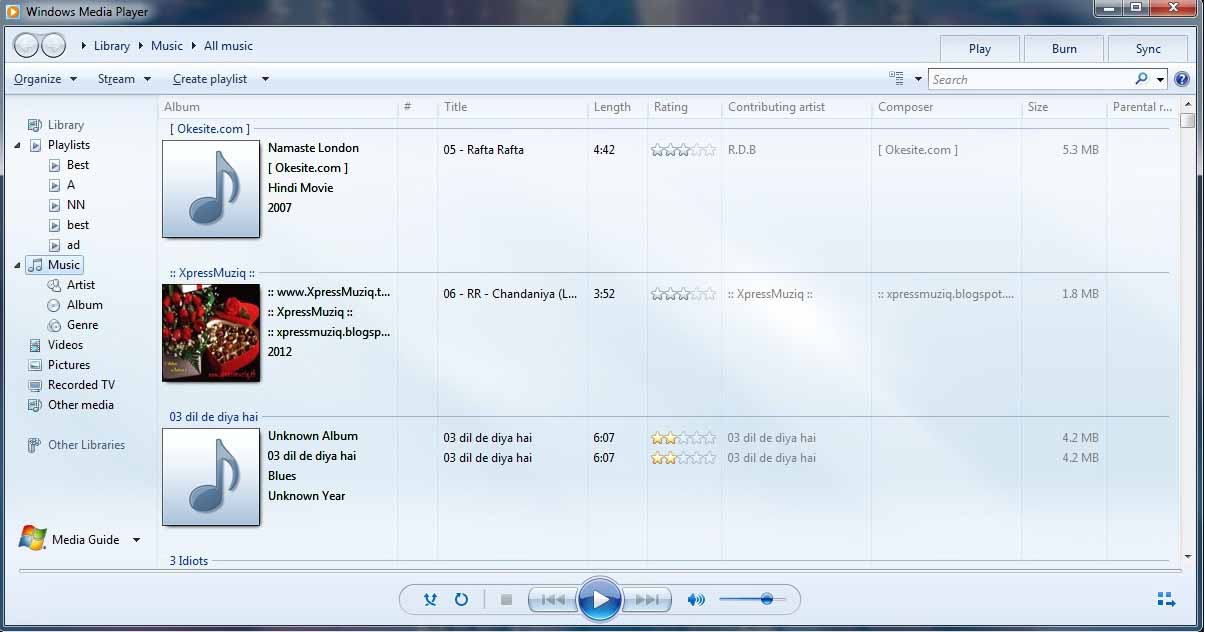
- Next You Need to Paste the Screenshot in the Desired Location i.e Paint or Document etc.Here below is an Example of Screenshot of Active Window Only
Note – Important Tips
- GIF Format is the Best Image Format for Saving the Screenshot of Active Window or ApplicationsWhereas JPEG Format makes the Image Quality Poor by making them Blurry and Blotchy
- If You are Using Microsoft Windows 7 or Windows Vista You Can Use the Default Snipping Tool Built Within the Windows for Capturing the Screenshot of Active Window or Application Only
How to Download Play Store Apps on PC
Posted by M Qasim A Siddiqui

 Now Run “Real APK Leecher.exe” as shown below


How to Download Play Store Apps on PC

1) First of all you need to Download Real APK Leecher Software.You can download it for free from here(Download Link). It is an archived ZIP file so after downloading the software UNZIP the file to a folder and then run the file “Real APK Leecher.exe” as shown below
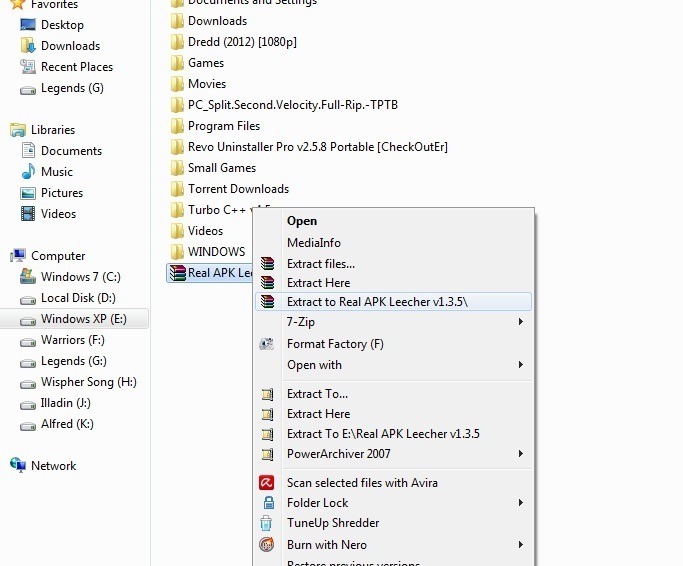 Now Run “Real APK Leecher.exe” as shown below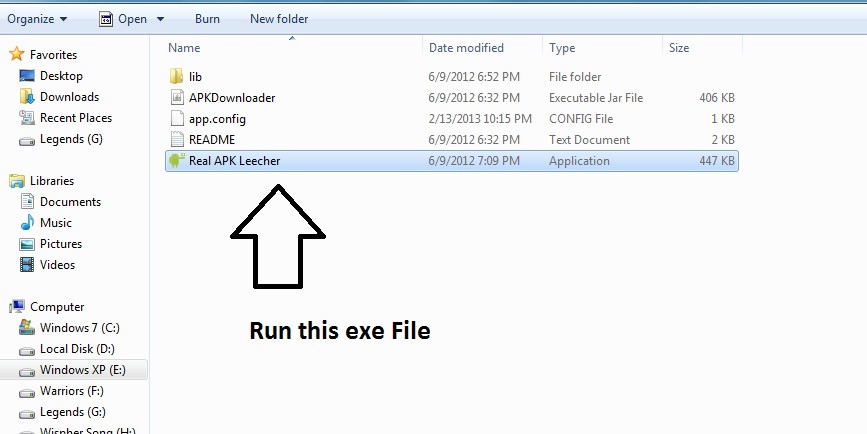
2) When you run “Real APK Leecher” for the first time it will ask you for your Google play storeAccount details and your DEVICE ID as shown below How to Increase Utorrent Download Speed
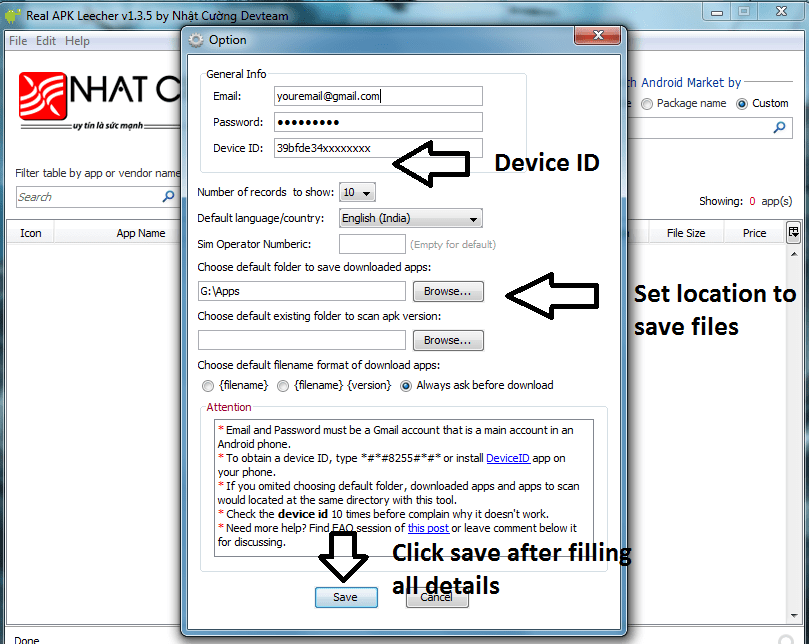
- You can check your DEVICE ID by dialing *#*#8255#*#* from your dialer and it will show your Device ID.If your using tablet having no dialer then you need to Download an app “Device ID” to know your DEVICE ID.You can download it from here(Download Link)
- Your Device ID will look like android – 39bfe2hsaxxxxxx But you do not need to put the wholeOnly put letters after android like 39bfe2hsaxxxxxx
- Now choose the folder where you want to save the apps on your PC
- After filling all the details Click on Save as shown in the above Image
Note – You can also change your all account details later by Pressing CTRL + O
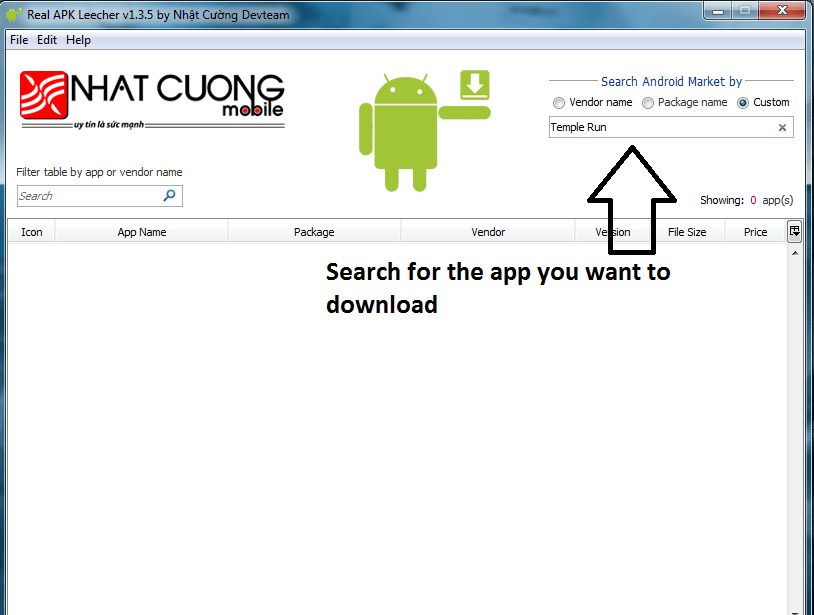
3) Now Search for the app you want to download.You can search by Vendor Name,Package Name or Custom Name How to Play Android Games on PC – BlueStacks
4) After searching select the app you want to download and Do a Right Click on the app and then click on Download this app as shown below.
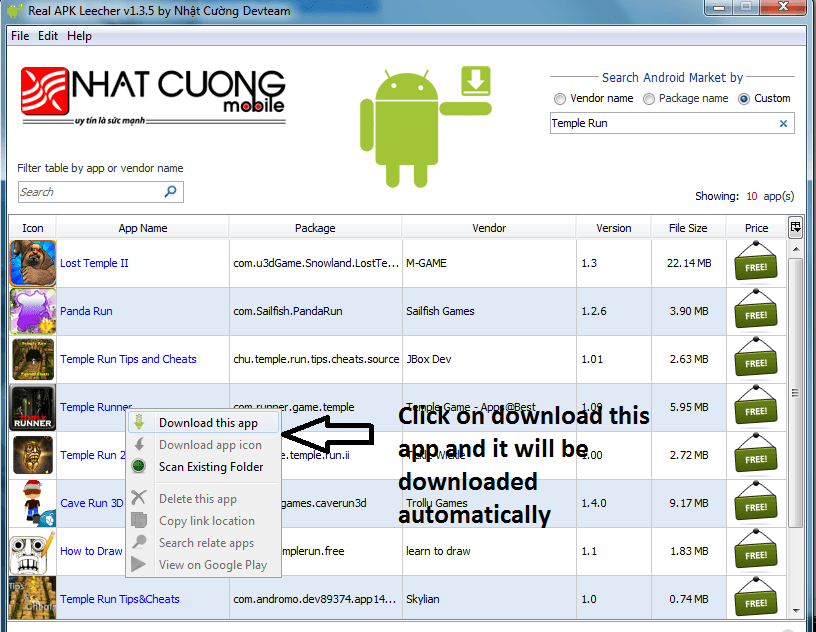
5) It will start Downloading the app
6) You are done and You have Successfully downloaded the app Top 10 Best Android Phones Under 10000
Note - Make sure you enter all the correct details and correct DEVICE ID else you will not able to download the apps.It will show you Connection error or Logging error
Note - You can also check for the updates for the apps you have downloaded.For this first you need to right click on any app shown in the search app list of Real APK Leecher and then click on Scan Existing Folder and it will ask you again for Scanning and click OK.It will then show you entire list of apps that you have downloaded.If your app is shown with an Exclamation mark then it means a new update is available for the app and if it shows a Green tick then there is no update available for that app How to Play Android Games on PC – BlueStacks
Disclaimer – Use this app on your Own Risk.We are not Responsible for any MISUSE of this app and it is for the INFORMATION PURPOSE ONLY
Or yar Follow b kr na Comment b ;)
Or yar Follow b kr na Comment b ;)
Subscribe to:
Posts (Atom)